What Sitecomb found on 919 Irish small-business websites
A phone number you can't tap, a link to a page that isn't there, and nothing to stop fake email in the business's name. Three problems, the numbers behind each, and how to fix them.
By the Sitecomb research team ·
Sitecomb runs website quality reviews. A review reads a website's public pages the way a visitor would and reports, in plain words, what needs attention. Usually that is one owner checking one site.
In October we ran the same check across 919 Irish small-business websites, to see which problems turn up again and again. The websites were drawn from OpenStreetMap across 14 towns and 8 kinds of business: food and drink, health, beauty, trades, shops, professional services, education and community. Each one was checked on its own on 5–6 Oct 2026.
Three of the problems we found are ones any owner will recognise. The first two can be tested on your own phone in under a minute; the third takes one question to whoever runs your email. We start with those. After them come the deeper findings: how email protection differs by kind of business and by town, the web addresses on the map that no longer exist, and the limits of what we measured.
We publish only what we have checked by hand. No business is named here or anywhere in our research.
Three problems you can check today
1. A phone number you can't tap
Somebody is standing outside with a leak, or sitting in the car trying to book a table. They find your website on their phone and see your number. They press it. Nothing happens. Now they have to copy it digit by digit into the keypad, and some of them won't bother.
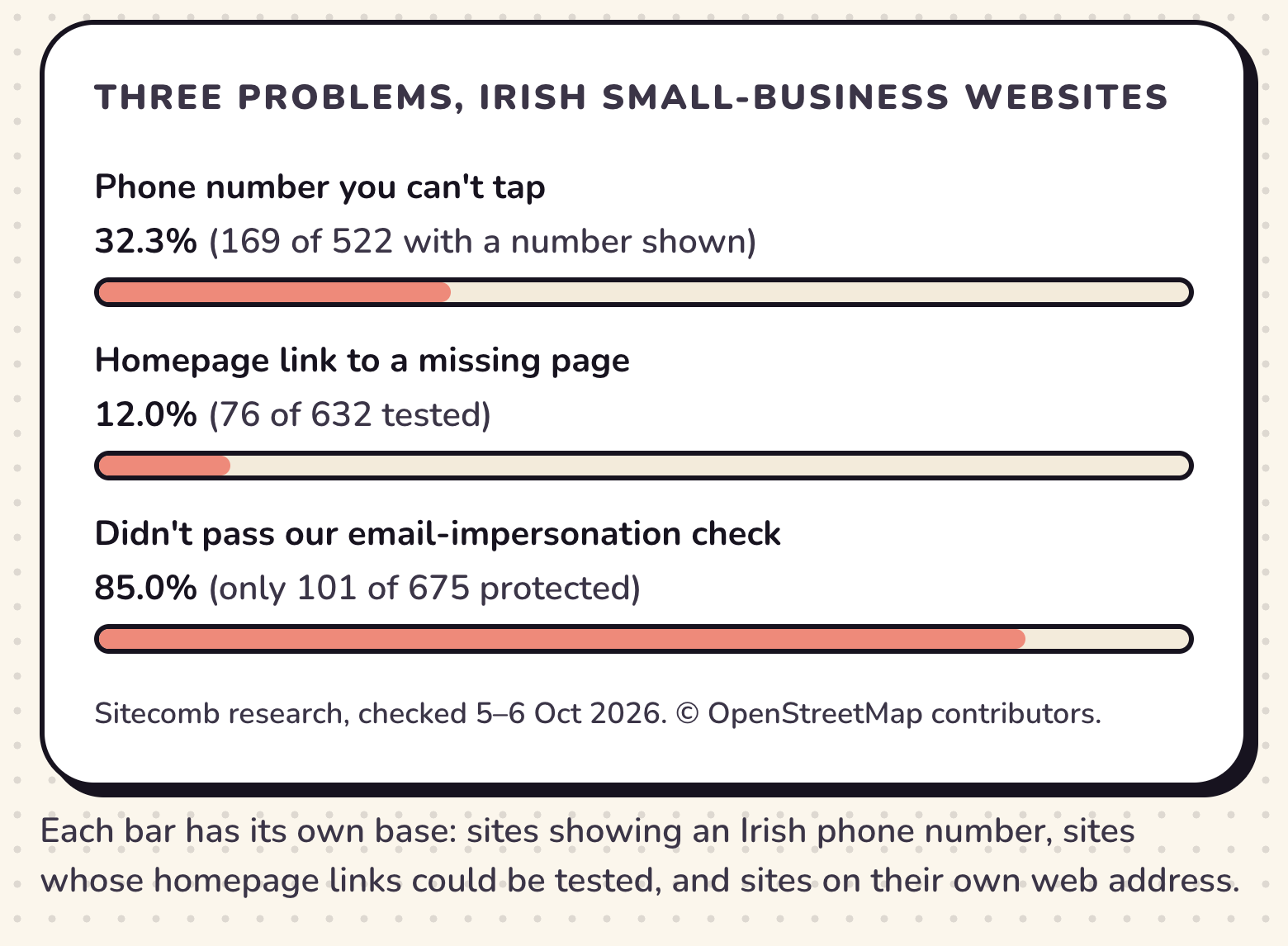
On 5–6 Oct 2026, 522 of the websites showed an Irish phone number on the homepage. On 169 of them, 32.3% or about 1 in 3, the number was plain text and not a tap-to-call link. The other 353 had the link.
The 10-second test. Open your website on your phone and press the number. If the phone offers to ring it, you are fine.
The fix. Ask your web person to "make the phone number a tel: link" everywhere it appears: the top of the page, the contact page and the footer. It is a small change to each number, not a redesign.
2. A link to a page that isn't there
A visitor taps "Menu", "Services" or "Book now" on your homepage and lands on "page not found". Usually a page was renamed or removed at some stage and the link to it stayed behind. The visitor only knows the thing they wanted isn't there.
In October, about 1 in 8 of the websites where we could test the homepage links (76 of 632, or 12.0%) had a link on the homepage to one of their own pages that no longer existed. We counted only links to the site's own pages that came back as missing. A page that blocked us or was slow to answer was not counted.
The self-test. On your homepage, press every item in the menu, every button and every link in the footer. It takes a couple of minutes.
The fix. For each link that leads nowhere, ask your web person to point it at the right page or take it out. If the page moved, ask for the old address to forward to the new one, so old links elsewhere keep working too.
3. Fake email sent in your name
A customer gets an email that looks like it came from your business. It carries an invoice, or a polite note saying "we've changed our bank details". It was not sent by you. Email was designed in a more trusting age: the "From" line on a message is a claim, not a proof. Unless a business publishes a particular record, it is much easier for anyone to send an email that looks like theirs. The business whose name was borrowed may never hear about it.
On 5–6 Oct 2026, 85.0% of the businesses in our sample whose website is on its own web address didn't pass our email-impersonation check. Only 101 of 675, or 14.9%, had the record that tells inboxes such as Gmail and Outlook to reject or quarantine emails that pretend to come from them.
We tested the checker before trusting it. Sixty of the sites, picked at random, were looked up again by hand. The checker was right on all 60.
There is a second, duller reason to care. Big email providers increasingly expect this record from senders.
A word of fairness. "Didn't pass" does not mean a business has been impersonated, and it says nothing about how safe its website is. It means that on those two days the public instruction to inboxes was not there.
The self-test. Ask whoever runs your email: "Do we have a DMARC record set to quarantine or reject?" Or run a website quality review at sitecomb.com, which checks it for you.
Three records, in plain English. Three settings do the work. All of them live with your domain name, not on your website.
SPF is a public list of the services allowed to send email for your domain.
DKIM is a signature your email service adds to each message, so the receiving inbox can confirm it really came from your domain and was not altered on the way.
DMARC ties the two together. It tells the inbox what to do when a message claiming to be from you fails those checks: nothing at all (monitoring only), put it in spam (quarantine), or refuse it (reject). It can also send you reports showing who is sending email in your name.
Our check passes a business only when DMARC is set to quarantine or reject. A record set to monitoring only, or no record at all, didn't pass. In both cases inboxes are not being told to stop the fake.
What to ask your web person or email provider.
- "Are SPF and DKIM turned on for our domain?" Whoever runs your email can do this: Google Workspace, Microsoft 365 or your web host.
- "Can you add a DMARC record, starting with monitoring only?" This changes nothing about how your email is delivered. It lets you see who is sending in your name.
- "Once our real emails pass, can we move it to quarantine?" Before that step, list everything that sends email for you: the newsletter tool, the booking system, the accounts package. This is why you start with monitoring. Skip it and your own invoices can land in spam.
- Check again after a day.
It is usually a quick job: a few lines of settings, and no change to the website.
The deeper findings
Email protection: trades were the least protected
Only 1 of the 50 trades businesses we checked (plumbers, electricians, builders and the like) had this protection. Professional services were the best protected, at 28.2% (33 of 117). That is still fewer than three in ten.
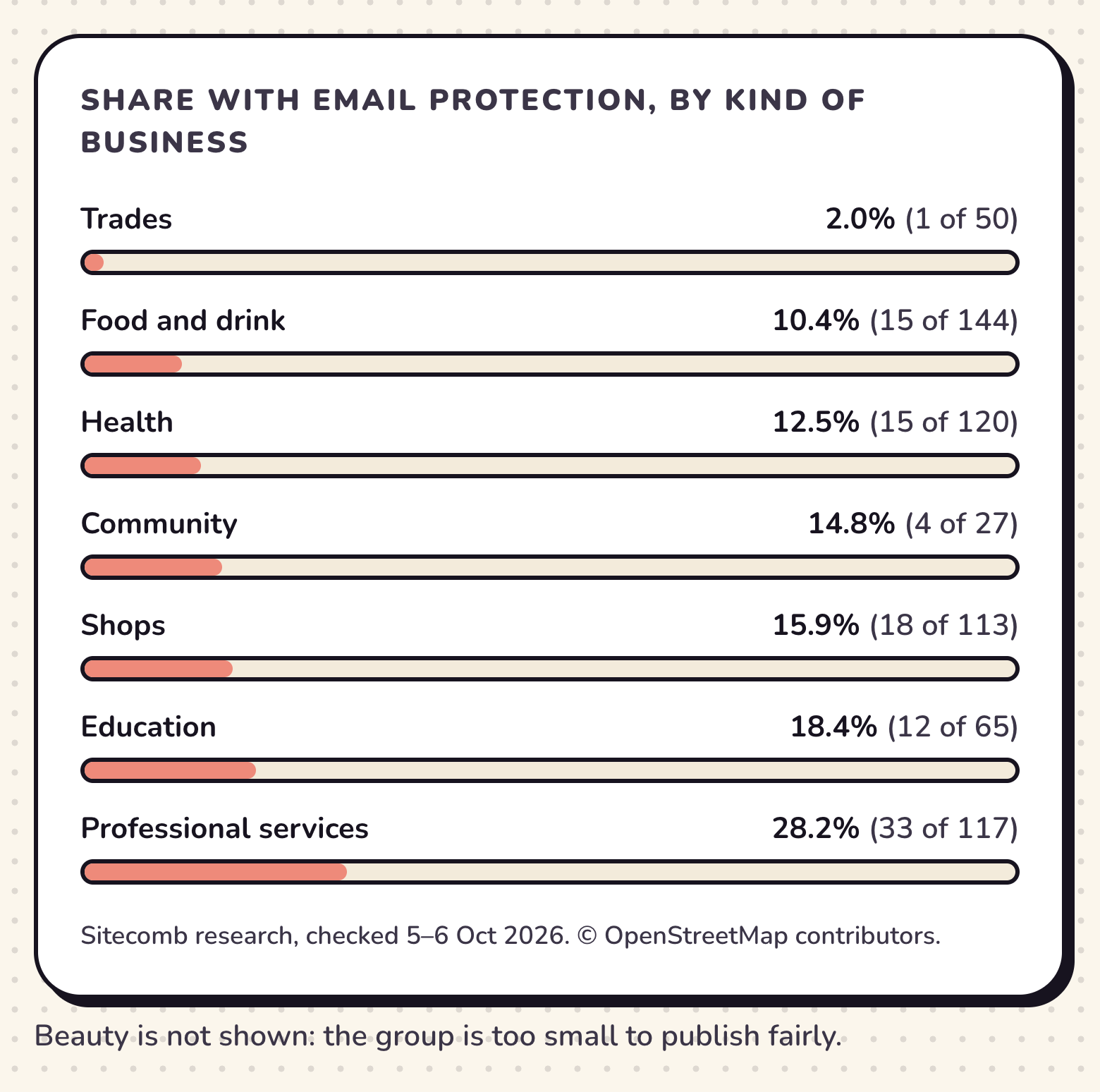
Share with email protection, by kind of business:
- Trades: 2.0% (1 of 50)
- Food and drink: 10.4% (15 of 144)
- Health: 12.5% (15 of 120)
- Community: 14.8% (4 of 27)
- Shops: 15.9% (18 of 113)
- Education: 18.4% (12 of 65)
- Professional services: 28.2% (33 of 117)
Beauty is not shown: the group is too small to publish fairly.
The data cannot tell us why the gap exists, and we won't guess. A tradesperson who sends quotes and invoices by email has as much reason to protect the name on them as a solicitor or an accountant.
Email protection: the same picture in every town shown
Protection varies about twofold between the towns shown. In none of them are most businesses protected.
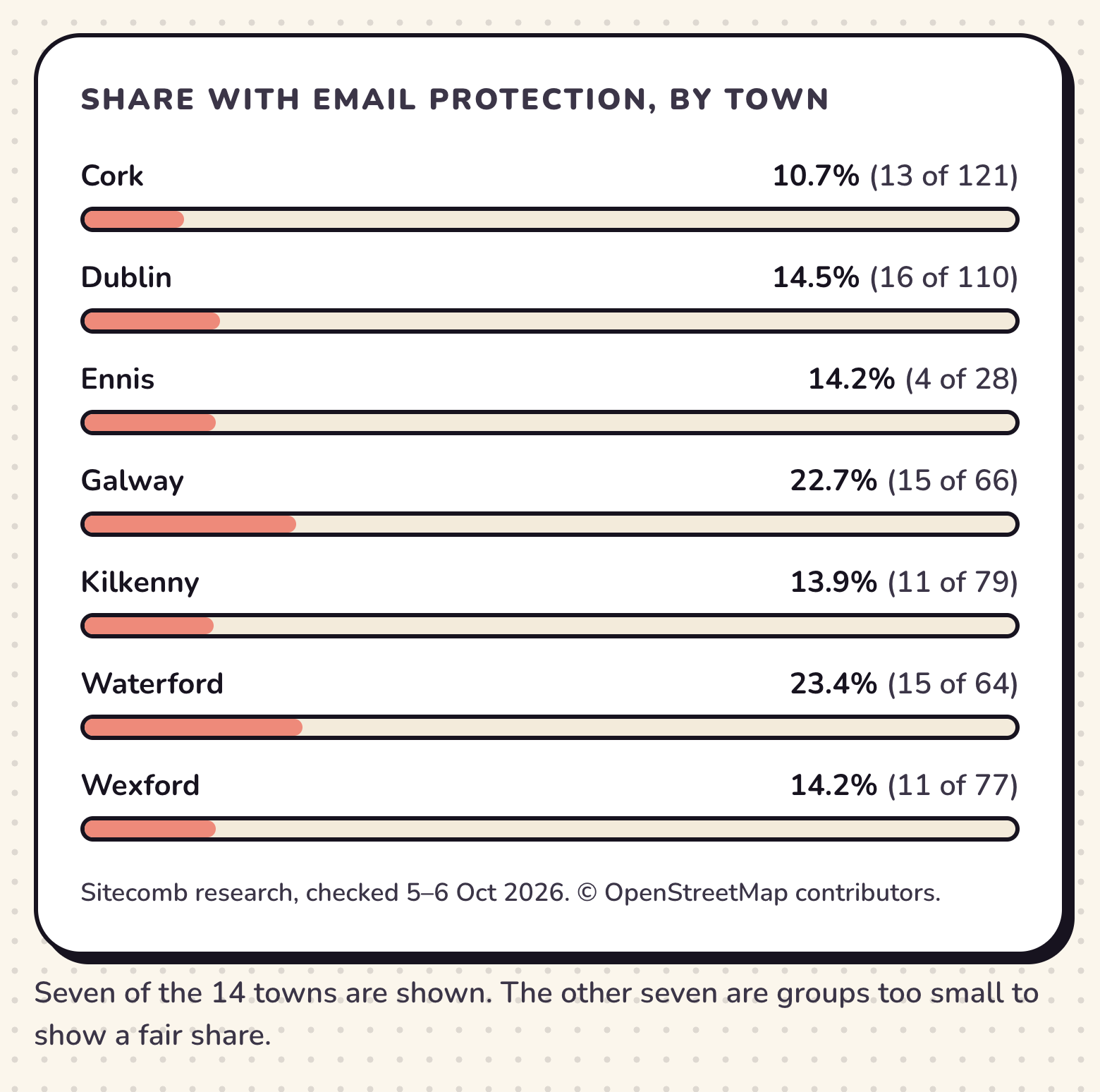
Share with email protection, by town (alphabetical):
- Cork: 10.7% (13 of 121)
- Dublin: 14.5% (16 of 110)
- Ennis: 14.2% (4 of 28)
- Galway: 22.7% (15 of 66)
- Kilkenny: 13.9% (11 of 79)
- Waterford: 23.4% (15 of 64)
- Wexford: 14.2% (11 of 77)
Please don't read this as a league table. Each figure describes the businesses we sampled in that one town, and nothing wider. Seven of the 14 towns are shown. The other seven are groups too small to show a fair share.
About 1 in 13 website addresses lead nowhere
7.9% of the business websites in our sample (73 of 919) no longer exist: the address doesn't lead anywhere.
We looked up all 73 again by hand. All 73 were still gone.
Some of these businesses will have closed. Others will have moved to a new address and never updated the map. We can't tell the two apart from the outside, and that is part of the story: the listing still sends people to a dead address. For a business that is still trading, it is a way to lose customers without knowing it. Somebody taps "website", gets an error and moves on to the next name.
Our study looked at one source, OpenStreetMap. We did not measure other maps or directories, but an old address that sits in one place may well sit in others. So:
- On your phone, tap the website link on every listing you have: map apps, your search profile, social pages, local and trade directories. Do it as a customer would.
- If a listing shows an old address, correct it. Anyone can edit OpenStreetMap. Most map and search profiles let the owner claim the listing and change it.
- If the address is the right one but doesn't load, ask whoever registered your domain name whether it has lapsed. Make sure it is registered in the business's name, with a contact email you still read, and set to renew automatically.
- If you have moved to a new address, keep the old one and point it at the new site.
What we could check, and what we couldn't
Of the 919 websites, 688 could be checked and scored. The rest could not: 116 blocked automated checks, 93 were down or no longer exist, and 22 didn't load. We count those separately. A site we couldn't check is never counted as passing or failing.
Each finding has its own base, which is why the "of" number changes. The email figures rest on 675 businesses: of the 688, 13 sit on a platform's shared address, where the email setting belongs to the platform and the owner cannot change it. The phone figure rests on the 522 websites that showed an Irish phone number on the homepage. The links figure rests on the 632 where we could test the homepage links.
The honest limits of this research
- The source. OpenStreetMap lists the businesses that mappers have added, not every business in Ireland. Our numbers describe the businesses in our sample.
- Sites we couldn't check. The 116 that blocked automated checks and the 22 that didn't load were never counted as passing or failing.
- Rounding. Every percentage is cut down to one decimal and never rounded up, so pairs such as 85.0% and 14.9% add up to 99.9.
- The dates. This is a snapshot of 5–6 Oct 2026. A record fixed today changes the picture, and some of these businesses may have fixed theirs since. When we went back by hand in November, a few sites had already been rebuilt or had their links put right.
- The two newest numbers. The phone and links figures come from the same October run. On 24 Nov 2026 we recounted them strictly and checked samples by hand. For phones, we kept only numbers in a real Irish phone format, and the check was right on 34 of the 35 sites we could judge. For links, across two samples, it was right on all 29 sites that could still be compared.
- Small groups. A town or kind of business is broken down only when the group has at least 20 websites. For groups under 50, we don't publish a share under 10% or over 90%, so a small group can't point at the businesses in it. That is why beauty and seven towns are missing.
- What we held back. We publish only checks that are right at least 95% of the time when tested against known answers. Missing opening hours looked common, but our October check read only the homepage and many businesses show their hours on a contact page. We are re-checking opening hours across whole sites before we publish a number. The same goes for the other areas a review covers.
If you own a site in the sample and want it left out of the next update, email hello@sitecomb.com and we'll take it out.
Where Sitecomb fits
The research started from the same check anyone can run on their own site. For the phone and link figures we applied stricter rules and checked samples by hand, and those rules are going into the review itself.
A Sitecomb website quality review looks at six areas: Security, Privacy & legal, Page health, Phone friendly, Contact details and Online visibility, which includes AI search. It reads only public pages, the way a normal visitor would. There is nothing to install and no login.
The three problems above each have a home in it. Tap-to-call sits under Contact details, beside the Phone friendly checks on how the site works on a small screen. Links to missing pages come under Page health. Email protection is part of Security, and it is the check behind the 85.0% figure. The full quality report then names each problem it finds, says why it matters and how to fix it, in words you can hand straight to your web person.
For the dead-address problem you need no tool at all. Tap the links on your own listings.
A review looks at what can be seen from outside your site. It is not a certificate and it is not legal advice. It is a quick, plain look at your website through a visitor's eyes.
See how your own website looks from the outside: run a website quality review at sitecomb.com.
The full study, with charts: sitecomb.com/research/ireland-2026
How our research works: sitecomb.com/research/method
Sitecomb research, checked 5–6 Oct 2026. Map data © OpenStreetMap contributors. The numbers may be quoted, and the charts reused, with a link to the study page.